Facebook Fundraising for Nonprofits: 5 Tactics + Setup Guide




Love it or hate it, whether you use it or not, the reality is that Facebook has changed the world permanently.
Whether it be connecting with friends and family, watching funny videos, or checking out news and causes, 2.9 billion people turn to Facebook monthly to get and share information.
Not only has Facebook changed the way humans (in most of the world) communicate, but it's also completely changed the fundraising game.
There are two ways for modern fundraisers to handle the popularity and proliferation of Facebook fundraising tools:
1. Shake your fist like Grandpa Simpson against the clouds, and wish that the “good old days” of fundraising would return. (Hint: They won’t.)
2. Shift your mindset, adapt your workflow, and make Facebook work for you!
I say let’s go with #2. Fundraisers should always aim to be more proactive than reactive, more forward-thinking than self-pitying. At least the successful ones (wink).
Let’s explore how fundraising on Facebook works and tactics your nonprofit can try.
How Facebook fundraising works for nonprofits
Facebook allows eligible 501(c)(3) nonprofits to collect direct, zero-fee donations through built-in social tools. Instead of redirecting users to an external website, Meta keeps the entire checkout process within the app to reduce friction and maximize conversion.
Here is a quick look at the core features and requirements driving Facebook fundraising:
- Eligibility and setup: Requires an official Facebook Page, verified 501(c)(3) status (or local equivalent), and enrollment in Meta Payment Services or PayPal Giving Fund.
- Donate button integration: Embeddable directly on your nonprofit’s Facebook Page header, organic posts, Stories, and Live video streams for one-tap giving.
- Official page fundraisers: Dedicated campaign landing pages hosted on Facebook to target specific projects, matching gifts, or emergency relief drives.
- Supporter and birthday fundraisers: Peer-to-peer campaigns where loyal followers create individual fundraisers, most commonly around birthdays, to raise money from friends on your behalf.
- Meta charitable giving tools: A back-end suite providing payout reporting, donor data access (where opted-in), and transaction management.
How to create and manage a Facebook fundraiser as a nonprofit
Once approved for Meta's Charitable Giving Tools, your nonprofit can launch campaigns, embed direct donate buttons, and track donations from Meta Business Suite. Here’s how you can do so:
- Turn on charitable giving tools: Open Meta Business Suite or Page settings, select Nonprofit Manager, and enroll in PayPal Giving Fund to enable automatic payouts.
- Create a fundraiser from your page: Go to Fundraisers (or tap Raise Money on mobile) and select Create campaign. Set your goal, end date, and story. Then, publish and pin the campaign to your Page.
- Add donate buttons to your content: Set your primary Page action button to Donate, add a Support nonprofit tag when drafting posts or Reels, and attach live donate buttons during Facebook Live streams.
- Manage, track, and thank supporters: Access Nonprofit Manager to export donor transaction reports, filter active peer-to-peer campaigns to post public thank-you comments, and monitor payouts delivered via PayPal Giving Fund (issued every 15-45 days).
Facebook/Meta eligibility requirements
Before your organization can collect donations on Facebook or launch native peer-to-peer campaigns, you must meet Meta's official eligibility criteria and configure your account tools.
Here are the key requirements for US-based nonprofits:
- Official 501(c)(3) status: Your organization must be a registered 501(c)(3) tax-exempt nonprofit recognized by the IRS, with a valid Tax ID / Employer Identification Number (EIN) and a registered bank account.
- Facebook page category and address: Your official Facebook page must have its primary category set to Nonprofit Organization or Charity Organization, with a physical street address listed in the Page's About section.
- Meta page verification: Your page must be confirmed by Meta to ensure authenticity before access to native giving tools is granted.
- PayPal Giving Fund (PPGF) enrollment: As of October 31, 2023, Meta transitioned its payment processing backend for US organizations exclusively to PayPal Giving Fund. To receive direct automated payouts (issued every 15–45 days), nonprofits must be enrolled in PPGF with a verified PayPal Business account. (Unenrolled nonprofits eligible on the platform can still receive funds, but payouts are issued via check up to 90 days out).
- Facebook Nonprofit Manager access: Once approved, your Page administrators manage payouts, donor reports, and campaign permissions through Meta Nonprofit Manager inside Meta Business Suite.
5 Facebook fundraising tactics to try
Here are five core tactics to help your organization turn organic connections into repeatable revenue, structured by what to do, why it works, and how to apply it:
1. Add a dedicated website page teaching supporters how and why to start a fundraiser.
- What to do: Build an easy-to-find resource page on your main website that walks supporters through launching and managing a Facebook fundraiser on your behalf.
- Why it works: Donors are rarely trained fundraisers. Asking friends and family for money can feel uncomfortable or daunting. Supplying clear storytelling frameworks and instructions eliminates technical friction and social anxiety.
- How to apply it:
- Title the page clearly for search, such as How to Set Up and Run a Facebook Birthday Fundraiser for [Nonprofit Name]
- Provide downloadable graphics, photos, short video links, and concrete data points showing the impact of their goal.
- Include tips on running the campaign—such as posting regular milestone updates, sharing personal stories, and publicly thanking individual donors.
2. Send targeted birthday emails to top donors and P2P fundraisers.
- What to do: Email your existing donors, race participants, and past peer-to-peer (P2P) fundraisers at the beginning of their birthday month to invite them to start a fundraiser.
- Why it works: Birthday gifts are deeply personal. Supporters who dedicate their birthdays to your mission demonstrate high affinity, making them far more likely to become major donors, monthly supporters, or legacy givers over time.
- How to apply it:
- Collect birth dates on sign-up forms and volunteer registrations.
- Send an inspiring email 30 days before their birthday, explaining exactly where donations go and how many lives their campaign can impact.
- Walk them through the setup steps with a direct link to your website's instructions page.
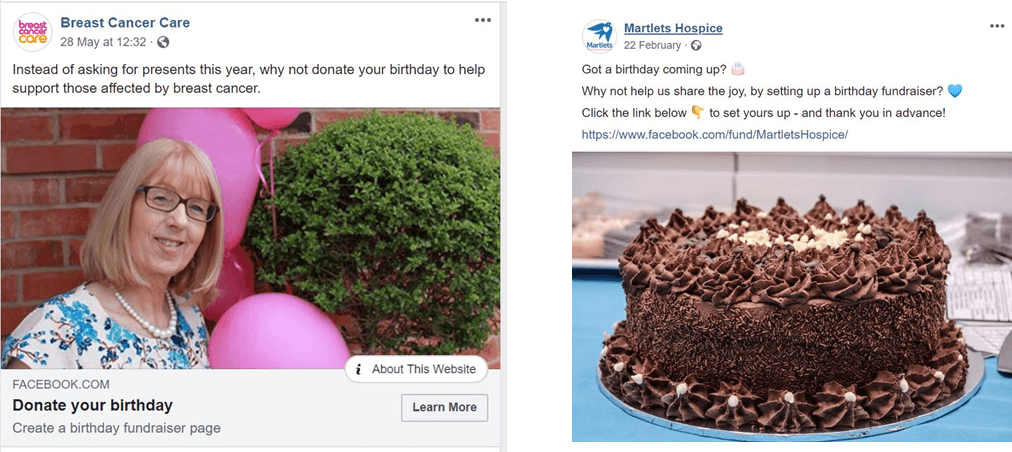
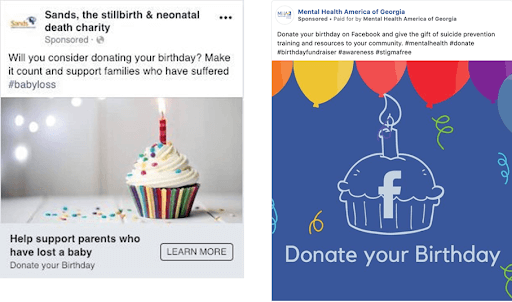
3. Use targeted Facebook ads to prompt birthday campaigns.
- What to do: Run hyper-targeted Facebook ad campaigns encouraging warm audiences to dedicate their upcoming birthdays to your cause.
- Why it works: Broadcasting ads to broad, unfamiliar audiences wastes budget on users who lack a connection to your mission. Retargeting engaged supporters reaches people who already know, trust, and care about your work.
- How to apply it:
- Build custom audiences targeting active page followers, website visitors, and uploaded email subscriber lists.
- Use Meta Ads Manager to target people with upcoming birthdays within those custom warm audiences.
- Keep ad creative focused on peer-to-peer empowerment with clear calls to action like "Pledge your birthday to help feed local families this month."
4. Publicly acknowledge and steward current birthday fundraisers.
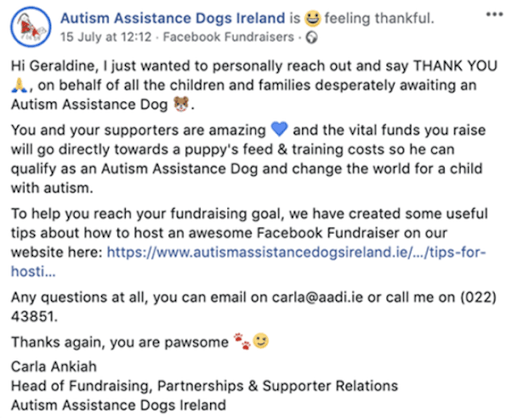
- What to do: Build an intentional acknowledgment strategy that publicly highlights and thanks individuals running Facebook campaigns for your nonprofit.
- Why it works: Fundraisers put their personal networks on the line for your cause. Public recognition makes them feel valued, builds long-term loyalty, and provides social proof that inspires other supporters to do the same.
- How to apply it:
- Comment directly on active peer-to-peer campaign pages with personalized gratitude and impact messaging.
- Feature top fundraisers in your email newsletters, on your official Facebook Page, or inside a dedicated website spot.
- Send a hand-written thank-you note or a digital impact report once their campaign wraps up.

5. Reframe third-party donors and focus on long-term stewardship.
- What to do: Stop viewing limited third-party donor contact data as an insurmountable barrier, and adapt your stewardship strategy to the nature of social giving.
- Why it works: Third-party donors give primarily because of their personal relationship with the individual fundraiser, not necessarily because of initial loyalty to your organization. Your primary relationship is with the campaign creator, who acts as your ambassador.
- How to apply it:
- Shift stewardship energy toward deeply engaging the fundraiser creator, who can then pass your impact updates along to their network.
- Focus on capturing opt-in contact information by providing downloadable resources, impact links, or email sign-up forms on your custom campaign landing pages.
- Treat third-party givers as warm prospects by encouraging campaign organizers to invite their donors to your public events or newsletter lists.
Facebook fundraising best practices for nonprofits
Successfully using Facebook as a fundraising platform requires more than just turning on native tools. It takes active community management, a balanced content cadence, and deliberate donor stewardship.
Here are four core best practices to boost conversion rates and build long-term supporter engagement:
Optimize your page setup and brand foundation.
Your Facebook page acts as a primary digital hub. Ensure every touchpoint conveys trust and clarity by:
- Setting up a primary donate button: Add a prominent Donate action button directly on your Page header so visitors can contribute in one click.
- Completing page verification and details: Categorize your Page as a nonprofit organization, complete your About section with a verified physical address, and maintain your official Meta Page verification status.
- Using outcome-focused cover media: Swap corporate logo headers for high-resolution photos or short native videos featuring real beneficiaries, volunteers, or field workers.
Follow an intentional content and video strategy.
To maintain organic reach under Meta’s feed algorithms, balance direct financial asks with value-driven community building. You can do so by:
- Following the 80/20 rule: Dedicate 80% of your posts to impact stories, educational carousels, and behind-the-scenes content. Reserve 20% for direct fundraising campaigns and calls to action.
- Prioritizing native short-form video: Post short video clips directly to Facebook Reels. Add clear captions.
- Showing tangible before-and-after transformations: Use real-time progress posts, data visualizations, or field-work footage to highlight exactly what a gift accomplishes.
Master donor engagement and P2P stewardship.
Because peer-to-peer (P2P) birthday campaigns drive significant revenue, treating campaign creators as long-term brand ambassadors is critical. Make sure to:
- Thank every campaign creator publicly: Use the Meta Nonprofit Manager filtering tool to identify active peer-to-peer fundraisers and post personalized thank-you comments on their campaign pages.
- Provide ready-to-use fundraiser kits: Make it easy for supporters by offering downloadable cover photos, pre-written story templates, and impact statistics on your website.
- Acknowledge donors in real time: Post milestone comments (e.g., "We're halfway to $1,000 thanks to Sarah's donors!") to maintain momentum before a campaign ends.
Implement ongoing community management.
Building a loyal community keeps your organization top of mind between major fundraising pushes.
- Maintain a consistent posting cadence: Post three to five times per week to stay active in follower feeds without overwhelming your audience.
- Build dedicated Facebook Groups: Create a branded Facebook Group for recurring donors, board members, or volunteers to share exclusive updates, campaign tips, and early event announcements.
- Drive traffic to owned donation channels: Include links to your owned, mobile-optimized website donation pages across organic updates to capture recurring gifts and complete donor contact information.
Facebook fundraising FAQs
Are Facebook fundraising tools free for nonprofits?
Yes. Meta covers all credit card and transaction processing fees for eligible 501(c)(3) nonprofits, meaning 100% of every donation made through Facebook native tools goes directly to your organization.
Why can't I create a fundraiser on Facebook?
Inability to launch a fundraiser usually stems from incomplete eligibility. Your Page must be categorized as a Nonprofit Organization, operate in an approved country, have verified admin permissions, and be fully enrolled in Meta’s Charitable Giving Tools.
Do nonprofits need PayPal Giving Fund to use Facebook fundraising tools?
Yes, for U.S. nonprofits. Meta uses PayPal Giving Fund (PPGF) as its exclusive payment processing backend in the United States. PPGF receives the funds and distributes direct electronic payouts to your bank account.
How do I allow supporters to create fundraisers for my nonprofit on Facebook?
Once Meta approves your nonprofit for Charitable Giving Tools, peer-to-peer fundraising capabilities activate automatically. Supporters can select your organization from Facebook's nonprofit directory when creating a birthday or personal milestone campaign.
What are Facebook fundraiser challenges, and how can nonprofits use them?
Challenges are time-bound virtual campaigns (e.g., "Walk 30 miles in September") that combine a dedicated Facebook Group with individual peer-to-peer fundraisers. Nonprofits use them to acquire new supporters, build community, and drive high-volume peer-to-peer revenue.
Wrapping up
I expect Facebook, Instagram, and YouTube fundraising to increase exponentially. As fundraisers, our job involves learning about these new tools, seeing if our donors are using them (or if they want to use them), and adapting our strategy accordingly.
It’s not about us. It’s about what our audience, our community, and our donors want.
For more information, support, and training on how to use social media for your nonprofit, check out some of my upcoming social media webinars on how to leverage these powerful tools to grow your nonprofit community.