Your First Donor Database: Common Questions and Answers
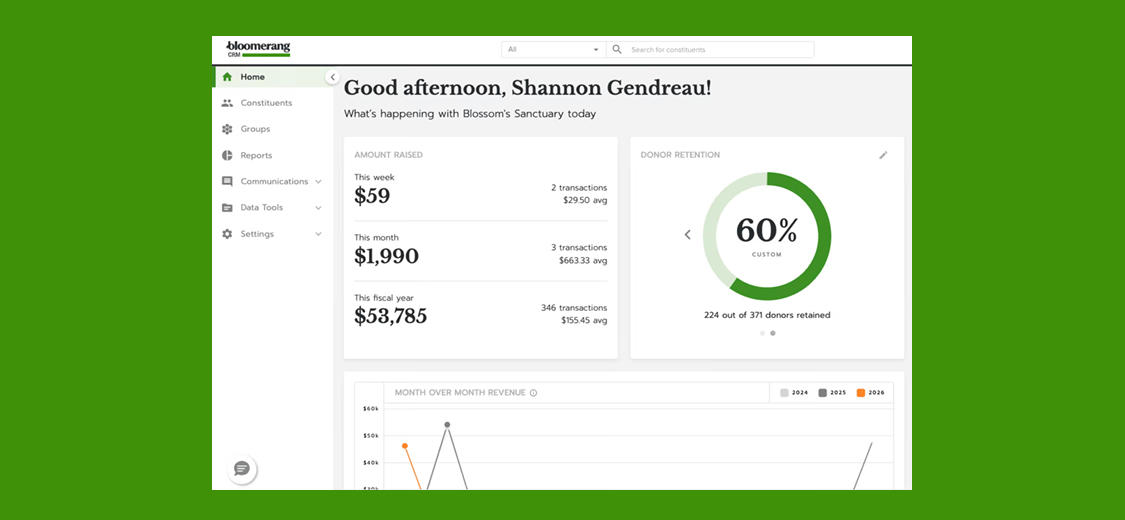



When it comes to nonprofits, donor retention refers to the percentage of donors who give a repeat gift within a specific window of time. If a donor gives to your organization in 2019 and also gives to your organization in 2020, they’ve been retained.
While getting new donors is important to organizational growth, retaining those donors over time is even more impactful.
To understand why, just consider the numbers. The average donor retention rate for nonprofits is around 45%. So for every 100 donors who give to your organization in a given year, only about 45 of them will give again.
Put another way, you’re regularly losing more donors than you’re retaining.
In order to increase donor retention, it’s important to understand what motivates donors. And in today’s data-driven world, one of the best tools for understanding donor behavior is Google Analytics. But if you want to use Google Analytics to improve donor retention, you first need to know how to use Google Analytics to your advantage.
In this guide, we’ll walk you through a few of the ways Google Analytics can be leveraged for nonprofits to understand donor behavior and improve donor retention.
Monitoring Your Donation Pages
The first step in improving donor retention is understanding your donor’s journey to your donation page. The goal with monitoring your donation page is to determine who’s visiting your site, how they’re getting there, and whether they’re making a donation when they visit.
These insights can give you invaluable information about what’s driving donors to your site and what’s compelling them to give. This can help you optimize your website and online donation experience to maximize donor conversions.
Here are some of the basic Google Analytics metrics to monitor on your donation page:
Page sessions
A session is one instance of a user visiting your donation page. Monitoring page sessions can give you an overview of how much traffic is visiting your donation page. You can view sessions over a period of time to identify trends in traffic.
New vs. returning users
Monitoring whether users are new or returning can give you a sense of how many donors are coming back to give again versus how many are first-time donors. This can be a helpful metric to measure your donor retention rate and look for improvements over time.
Pageviews
Pageviews shows you the number of times a page has been viewed. This can be a helpful metric to gauge the level of interest donors have in your campaigns and fundraising initiatives. Tracking pageviews can give you insights into which fundraising campaigns are resonating most with your donors.
Bounce rate
Bounce rate is the percentage of users who visit your donation page and then navigate away from your site without taking any action. A high bounce rate can signal that your donation page is not effectively engaging potential donors. If you have a high bounce rate on your donation page, you may want to consider improving the design of your donation page or the quality of your donation page copy.
Average session duration
The average session duration metric shows you how long on average a user spends on your donation page. This can give you insights into whether donors are taking the time to engage with your content before making a donation or if they’re just quickly visiting your page.
Conversions
Conversions give you the total number of completed donation transactions. This is an important metric for tracking the effectiveness of your fundraising and improving your donor retention strategy.
Identifying Traffic Sources
Google Analytics can also help you identify how donors are finding your website. Specifically, Google Analytics can show you your traffic sources, which tells you where your website visitors are coming from.
There are five main traffic sources tracked in Google Analytics:
- Direct: Users who type your URL directly into their browser or who click on a bookmark
- Organic search: Users who find your site through a search engine like Google
- Referral: Users who click on a link to your site from another website
- Social: Users who click through to your site from a social media platform
- Email: Users who click through to your site from an email
Understanding which channels are driving the most traffic to your donation page can help you allocate your marketing resources more effectively. For instance, if you find that most of your donors are coming from social media, you may want to invest more resources into your social media marketing efforts to attract more donors.
You can also compare the effectiveness of different traffic sources by looking at the conversion rate for each source. This can give you insights into which channels are most effective at converting visitors into donors, helping you optimize your marketing efforts for better donor retention.
Using Google Analytics for Donor Segmentation
One of the most powerful features of Google Analytics is the ability to segment your audience. Audience segmentation allows you to divide your donors into different groups based on specific criteria. This can be incredibly useful for personalizing your donor outreach efforts.
Some ways you can segment your donors using Google Analytics include:
- First-time vs. returning donors: By segmenting your donors into first-time and returning donors, you can tailor your outreach to each group. For example, you might create a special welcome series for first-time donors, while focusing on building stronger relationships with returning donors.
- Donors by location: If your nonprofit operates in multiple locations or serves a geographically dispersed community, segmenting your donors by location can help you tailor your outreach to different regions. This can be especially useful for local fundraising events or regional campaigns.
- Donors by device: Segmenting your donors by the device they use (desktop, mobile, tablet) can give you insights into how donors are engaging with your website. If a large portion of your donors are using mobile devices, it might be worth investing in a mobile-optimized donation page.
By using Google Analytics to segment your donors, you can create more personalized and effective donor outreach strategies, ultimately improving your donor retention.
Using Google Analytics for A/B Testing
Another powerful feature of Google Analytics is A/B testing (also known as split testing). This allows you to test two different versions of a web page to see which one performs better.
For nonprofits, A/B testing can be a valuable tool for optimizing your donation pages. For example, you might test two different versions of your donation page — one with a large hero image and one without — to see which version results in more donations.
By testing different elements of your donation page, you can identify what design choices, copy, and calls-to-action resonate most with your donors. Over time, these optimizations can significantly improve your donation page’s performance, leading to more donations and better donor retention.
Leveraging Google Analytics Reports
Google Analytics offers a wide range of standard reports that can be incredibly useful for nonprofits. Here are a few reports to pay attention to:
- Audience Overview Report: This report gives you a high-level overview of your website’s visitors, including information about their demographics, interests, behavior, and technology use. This can help you better understand who your donors are and how they’re interacting with your website.
- Acquisition Report: This report shows you how visitors are finding your website — whether through organic search, social media, email, or other channels. This can help you identify which marketing channels are most effective at bringing in potential donors.
- Behavior Report: The Behavior Report provides insights into how users are interacting with your website. It includes data on pageviews, bounce rate, and average session duration for each page on your site. This can help you identify which pages are most engaging to donors and which pages might be turning potential donors away.
- Conversions Report: If you’ve set up goals in Google Analytics (which we’ll discuss in the next section), the Conversions Report will show you how often users are completing those goals. For nonprofits, this typically means how many people are completing donations.
Setting Up Goals in Google Analytics
One of the most powerful features of Google Analytics is the ability to set up goals. Goals allow you to track specific actions on your website, such as completing a donation or signing up for a newsletter.
To set up a goal in Google Analytics, follow these steps:
- In Google Analytics, navigate to the “Admin” section.
- Under the “View” column, click on “Goals.”
- Click on the “New Goal” button.
- Choose a goal template or select “Custom” to create a custom goal.
- Enter a name for your goal and select the type of goal (Destination, Duration, Pages/Screens per session, or Event).
- Set up the goal details, such as the destination URL for a Destination goal.
- Click “Save” to create the goal.
Once you’ve set up your goals, you can track how often users are completing them. This can give you insights into how effectively your website is turning visitors into donors.
For example, if you set up a goal to track completed donations, you can monitor how many users are completing donations and identify trends over time. If you notice a decline in completed donations, this could be a sign that you need to optimize your donation page.
Integrating Google Analytics With Your Nonprofit CRM
To get the most out of Google Analytics for donor retention, it’s beneficial to integrate it with your nonprofit’s Customer Relationship Management (CRM) system. A CRM system is a tool that helps you manage your relationships with donors, including tracking donor interactions, managing donor data, and automating donor communications.
By integrating Google Analytics with your CRM, you can get a more complete picture of your donors’ behavior, from their initial visit to your website to their long-term donation history. This can help you better understand what drives donor retention and tailor your outreach efforts accordingly.
Some CRM systems, like Bloomerang, offer native integrations with Google Analytics, making it easy to connect the two systems and start leveraging the combined data for better donor retention strategies.
Conclusion
Using Google Analytics to improve donor retention is a powerful strategy for nonprofits. By monitoring your donation pages, identifying traffic sources, segmenting your audience, and using A/B testing, you can gain valuable insights into donor behavior and optimize your outreach efforts for better retention.
Remember, donor retention is about building long-term relationships with your donors. Google Analytics can provide the data you need to understand your donors better and tailor your outreach to meet their needs, ultimately leading to more donations and greater impact for your nonprofit.