[NEW FEATURE] Task Update, Including User-Specific Tasks!

We have overhauled how Tasks work in Bloomerang so it is easier to use tasks for more things in your organization.
Tasks Goodness
First and foremost, we added the ability to associate a user with a Task. You can leave a newly created task assigned to yourself or pick another user in the system!
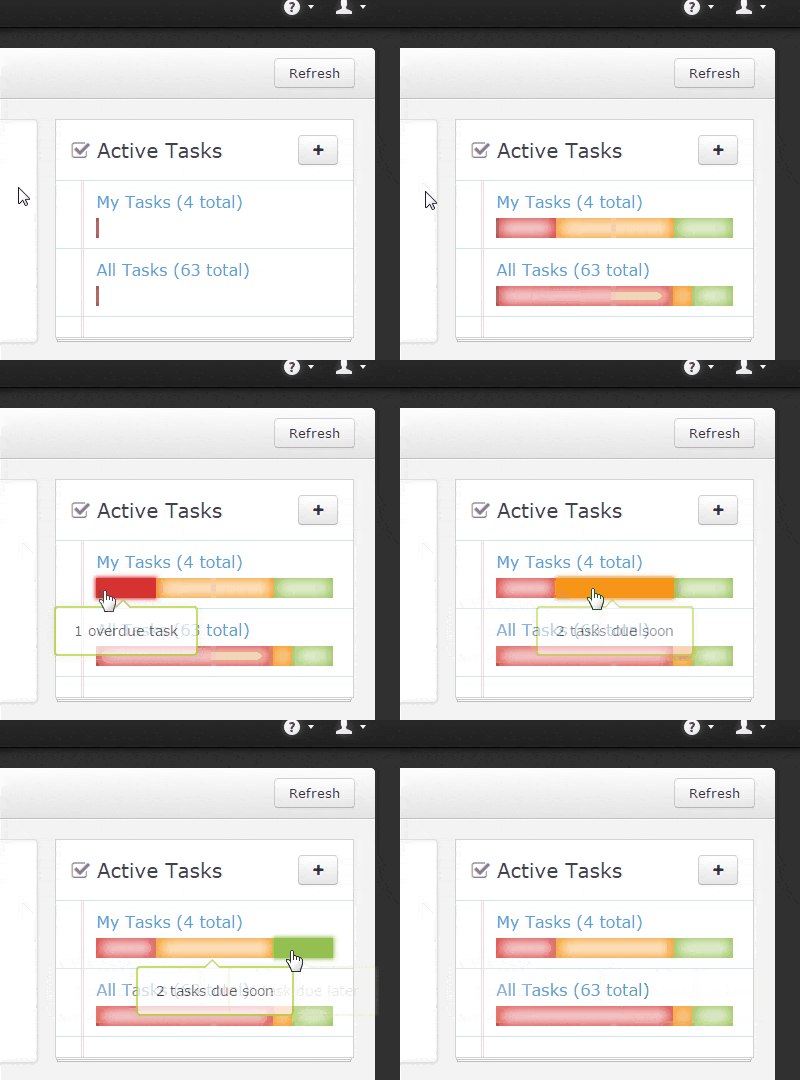
With the update to add user specific Tasks, we needed a clearer way to view them, so we updated the Tasks tile on the Dashboard. Now we show two items: Your Tasks and All Tasks, with totals for each. Depending on the due dates of the tasks in your organization, you can have up to three categories within each section: Overdue, Due Soon, and Due Later.

Clicking on one of these sections will take you to the new task list page with filters already applied.
We’ve also reworked the Tasks list screen to allow you to easily filter for the items you need by clicking on tags or typing search terms into the search box.
There are a number of other items that will make tasks more useful:
- Create tasks directly from the Dashboard
- Tasks completed as Interactions are now able to be reported on
- Purpose is no longer a required field
- Tasks can be created without Constituents
For more information on how these features work, you can look at our Task help pages.


Comments
Kristen Hay
Hi Emily- please email support@bloomerang.com and they'll be able to help with reporting.Emily Gaffney
Thanks for these updates and improvements! I would love to be able to run a Constituent + Tasks report to be able to see which Constituents do not have tasks assigned to them (which would be a big oversight/mistake!). I would also like to be able to group tasks by week or month across the top with constituents down the left to be able to see when the development team is going to be busy (and better spread out our plans). If this reporting already exists, I'd love to know. Thanks!Jill Johnson
Also, can we have the ability to apply custom fields to tasks?Jill Johnson
Can a task be generated from a note? Meaning, if I've saved a strategy in a note for a constituent, can I generate a next step as a task? For example, I've saved a strategy for Mr. Smith with the end goal of him purchasing a gala table. After I enter this strategy as a note, I want to log the next step needed which will be to take Mr. Smith to lunch. At the same time, I may also want to assign a task to a colleague who handling mailing and emailing the event invitation, asking her to include Mr. Smith on the distribution lists for the gala invitation (let's say he doesn't have any other relationship - transactions, interactions, etc. - with the gala and might not be captured in a general direct mail pull). Once my colleague has sent invitations, she can mark that interaction as a completed task. Once I have had lunch with Mr. Smith, I can update the original note and schedule the next task which could be "send proposal to Mr. Smith". Once that proposal has been sent, then I can update the original note, and generated a new task like, "Follow up with Mr. Smith and confirm purchase.", etc., etc., etc...Lauren Camp
Can users be notified when a tasks is assigned to them?Steven Shattuck
Lots more cool things are on the way!Marisa Vrooman
This is so exciting! Hallelujah! This ROCKS! Thank you guys for centennially improving an already great platform!Steven Shattuck
We're excited too :)shelley rizzotti
YAYAYaSteven Shattuck
Not right now, but I will pass the suggestion on to the dev team!Steven Shattuck
We were getting tired of Harry Potter :)Steven Shattuck
Working on it!Jen
I am glad Star Wars was used for example. I have much deeper love for the people at Bloomerang after seeing that. ;)Michael
Are users notified via email when a new task is assigned to them?Trish Ellis
Very helpful. Thanks!Farrah
Great additions! Now, if only we could report on relationships we would be "golden"! Thank you all for your hard work!Steven Shattuck
Yeah!Gayle
Great changes to the Tasks! Thanks!