Nonprofit Donation Page Best Practices: 30+ Tips & Examples





Your online donation page is your virtual fundraising hub, enabling donors to support your cause from anywhere, at any time.
However, just because someone lands on your nonprofit’s donation page doesn’t mean they will make a gift. According to the M+R Benchmarks 2026 report, the average nonprofit donation page conversion rate is just 11% for desktop and 8% for mobile.
Fundraising statistics also show that, when it comes to online giving, 63% of donors prefer to give with a credit or debit card, 10% prefer PayPal, 5% prefer a wire transfer, and 1% prefer a digital wallet like Apple Pay or Google Pay.
This guide reviews best practices for creating an effective online donation page that drives conversions and boosts revenue. We’ll cover:
- What is a donation page?
- Why do nonprofits need optimized donation pages?
- 30+ donation page best practices for nonprofits
- 10 of the best nonprofit donation page examples for inspiration
- Donation page best practices checklist
- How can nonprofits set up a donation page?
- How Bloomerang helps build high-converting donation pages
What is a donation page?
A donation page is an online form on a nonprofit’s website that supporters can use to contribute funds to the organization’s mission.
Donation pages allow supporters to give anywhere, at any time. These pages can help you reach a global audience with your organization’s mission. They also provide a secure way for donors to submit donations remotely rather than in person.
Why do nonprofits need optimized donation pages?
To reach a broader donor audience and keep up in today’s digital-first world, your nonprofit needs more than just a run-of-the-mill donation form. You need an optimized giving page that exceeds donors’ expectations and boosts your organization’s reputation.
Optimized donation pages offer multiple benefits, allowing you to:
- Appeal to supporters’ giving preferences. 63% of donors prefer to give online using a debit or credit card, making this the most popular giving option. However, 42% of people will leave a website due to poor functionality, underscoring the importance of having a well-designed, fast-loading donation page.
- Allow supporters to give at the moment of inspiration. With a convenient online giving process, supporters can give to your organization immediately, rather than having to pull out their checkbooks. They can immediately submit a gift, whether they’re using a computer, mobile phone, or tablet to view your website.
- Gather donor data to personalize marketing outreach. By integrating your giving page with your nonprofit’s donor management system, you can immediately transfer donor information to your supporter database. For example, you can use your giving page to gather donors’ names, contact information, and payment methods.
- Reassure supporters with a secure giving process. Your donation page should offer a secure giving experience, with PCI-compliant payment processing and other cybersecurity measures that protect donors’ sensitive information. A secure donation page reassures donors and increases trust in your nonprofit, improving supporters’ overall impression of your organization.
30+ donation page best practices for nonprofits
We’ve grouped each best practice into the following categories:
Feel free to jump to a certain section if you’re looking for specific advice, or read through the full post. Let’s get started!
Optimized design
The structure and look of your donation page play a major role in whether supporters feel motivated to complete the form. Implement these best practices to develop a clean, engaging, and intuitive donation page design:
1. Choose the right online fundraising platform.
A robust nonprofit fundraising platform makes it easy to create and promote your online giving form. These platforms take the guesswork out of donation page design by offering tried-and-true templates that still allow you to fully customize your page to your organization.
Plus, they offer a variety of features to steward donors after they contribute through your online donation page. This includes sending donors personalized thank-you messages and adding them to a new donor communications cadence.
Powerful fundraising platforms like Bloomerang Giving Platform® enable you to optimize your online donation process with:
- Dynamic, responsive donation buttons to include throughout your website
- Customized online giving forms for general fundraising and specific campaigns
- Ticketing and event tools that empower attendees to make one-time or recurring donations while registering for events
- A robust donor portal where supporters can review their donation history, update their credit card information, and manage their recurring gifts
- Peer-to-peer and crowdfunding tools that put supporters in the fundraising driver’s seat
If you’re interested in upgrading your online donation platform, think strategically about your options. Read reviews and testimonials and request demos for your top options. Make your final decision with the help of team members who will use the platform daily.

2. Include a compelling reason to give.
Use your donation page to remind prospective donors why you’re fundraising and what your goal is. Include a brief description of your fundraising purpose at the top of the page and a compelling image that highlights your mission.
For example, the ASPCA’s donation form includes a succinct description of the ASPCA’s mission to end animal abuse and neglect. It describes how donors’ gifts can help support that mission and make a difference for animals in need. Plus, it includes a carousel of suggested donation amounts with photos of different animals that the organization has helped.
This powerful combination of text and images sparks compassion and empathy in donors, encouraging them to follow through with their intention to give.

3. Connect donation amounts to specific impacts.
Connect specific donation amounts to different impacts that donors can make. This helps donors visualize how their donations actually make a difference. Plus, donors may feel encouraged to give more when they see the additional benefits they can bring to your organization’s work with larger donations.
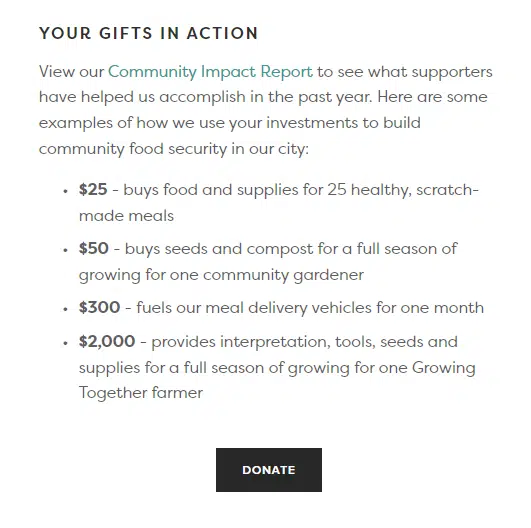
Take a look at a real-world example of this on the Nashville Food Project’s online donation form. The form lists four suggested donation amounts and how the organization uses those gifts:
These examples are powerful because they’re specific and descriptive. The donation page tells donors exactly how their support will fuel the organization’s mission and also provides an opportunity to review community impact reports to learn more about how donations are used.
4. Brand your donation page to your nonprofit.
Your nonprofit likely invested significant time and effort in developing your branding strategy. You chose your logo, colors, and fonts deliberately to reflect your organization’s mission and values. Then you incorporated your branding throughout your marketing materials, including your website, social media, and direct mail.
Similarly, your online donation page should also be fully branded to your organization. A branded donation page reassures donors that they’re giving to the right organization. Plus, it helps spread brand awareness and recognition.
Include the following brand elements on your donation page:
- Logo
- Colors
- Font
- Tone
- Message
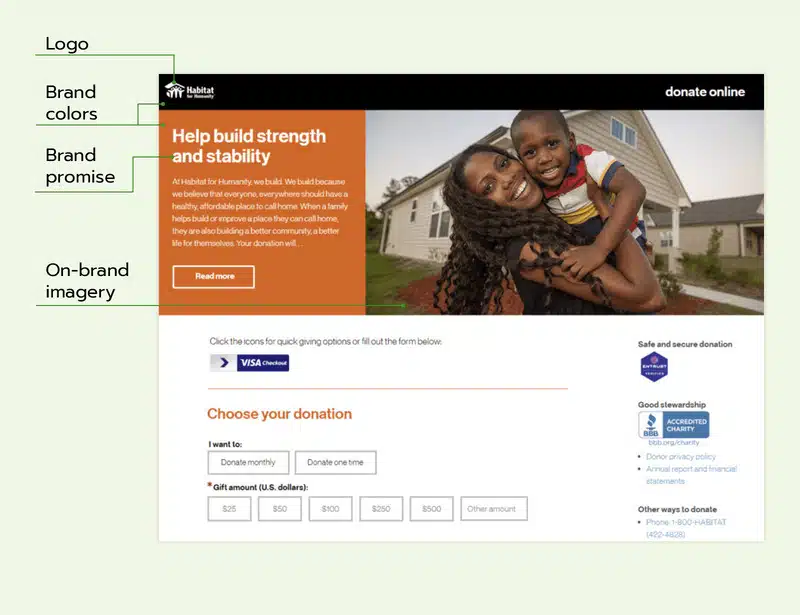
For example, the Habitat for Humanity online donation page is branded with the organization’s logo, colors, and imagery:
While visual branding makes your forms easier to recognize, you should also incorporate your organization’s voice into them. Include your mission statement on your donation page to clearly explain what your nonprofit does to help the community. Tell your potential donors how their gift can make a difference in your efforts.
5. Only ask for necessary information.
Keeping your donation form simple and short allows donors to complete it as quickly and easily as possible.
Only ask for the necessary information, such as:
- Names
- Donation amount
- Contact information (to follow up later and thank donors for their gifts)
- Payment details
This information is all you will need to process donors’ gifts and connect with them later to show appreciation and offer more ways to engage with your organization. Collecting only the necessary information can also help keep your CRM less cluttered, making it easier to access important donor information.
6. Make your donation form mobile responsive.
Mobile users account for a growing share of online donation transactions and 52% of nonprofit website traffic. Mobile-friendly pages also improve your SEO, making your donation pages easier for donors to find online.
Check your donation form in mobile view to ensure there aren’t any formatting errors that could disrupt the mobile experience. Ask these questions as you review the page:
- Are the images clear and fully visible on the page?
- Is the text large enough to be read on mobile devices?
- Are the form fields easy to click on in the mobile view?
- Does the page load quickly (in three seconds or less)?
If you answered no to any of these questions, review and edit your donation page in the mobile view of your content management system.
7. Ensure your donation page is accessible.
Online accessibility is the process of making websites more inclusive by ensuring that people with permanent or temporary disabilities can use them. Accessibility is essential for making the web more inclusive, but unfortunately, 96.3% of website homepages have accessibility failures.
To increase your online donation form’s accessibility, design it with the Web Content Accessibility Guidelines (WCAG) in mind. These guidelines provide clear instructions for making your site more accessible. Here are a few examples of guidelines that apply to nonprofit donation pages:
- Ensure there’s sufficient color contrast between the background and foreground text. Color contrast is the difference in brightness between the background and text. The text should be distinct enough to be easily read, even by individuals who have visual impairments.
- Avoid any flashing or strobing elements. These can create a negative user experience and even cause seizures.
- Include alternative text for images and captions for videos. Alternative text is metadata you can add to each image to describe it in detail. This ensures that screen readers and search engines can interpret images.
- Label form fields using descriptive text that isn’t inside the fields themselves. This ensures that these descriptions can be read by screen readers and other assistive technologies.
By making your online donation form accessible, you ensure that anyone who wants to donate can do so without barriers. This can support your organization’s broader goal of making all your opportunities, from donating to volunteering, more accessible to all community members.
8. Use A/B testing to assess different versions of your form.
Use A/B testing to assess how your audience responds to different donation page designs. A/B testing is the process of designing two different versions of your giving form and using website analytics to determine which page had a higher conversion rate.
Consider using different images, suggested donation amounts, and page formats (multipage vs. single page) to determine which options your audience responds best to.
For example, here’s what an A/B image test might look like:
Make sure to just change one page element at a time when conducting A/B tests. This allows you to pinpoint which changes make a difference.

9. Pay attention to aesthetics.
Don’t underestimate the power of a clean, engaging, stylish page design. An aesthetically pleasing donation page can enhance your brand image and provide a better giving experience. Studies have even shown that 81% of people think less of a brand with an outdated website.
Consider incorporating evergreen design trends that make your page timeless. Elements like lots of white space, strong color contrast, and large buttons will always be in style because they’re both streamlined and user-friendly. Adding these elements will ensure that you don’t need to constantly update your giving form to keep up with fleeting trends.
10. Optimize your submit button.
The submit button is the most important call to action (CTA) on your online donation form. It’s the final button donors will click to submit their gift. It should stand out on the page and make it clear that clicking the button will send donors' funds to your organization.
Play with the wording and formatting of your submit button. For example, you might try different phrases, such as “Give Now,” “Submit,” or “Donate Now.” Conduct A/B testing to determine whether one wording option leads to higher conversions.
You can also try different font styles or button colors to see which option yields the greatest audience engagement.
11. Use compelling imagery.
Humans are visual creatures—we're drawn to images, especially ones that feature other humans. The human brain can process visuals in as little as 13 milliseconds, making images a compelling way to convey the emotional impact of donations very quickly. This makes photos a useful tool for your online donation page. Research shows that photos of people are particularly memorable, with an average memorability score of 82 percent, compared to photos of nature at 61 percent.
Choose just one compelling hero image to include in your giving form to remind donors who they will help through their gifts. For example, the Covenant House donation page includes an image representing the young people that the organization supports:
Including just one image keeps the main focus on the giving process while giving donors an inspirational reminder of what their gifts can accomplish. The goal is to create an emotional response to your cause without overwhelming your donors.

12. Include a fundraising thermometer.
People are more likely to give if they feel the need for funds is time-sensitive. One way to encourage this sense of urgency is a fundraising thermometer, which helps your donors see how much more you need to raise for your campaign.
Including a fundraising thermometer on your nonprofit donation page increases your donors’ excitement and lets them visualize how much they can help your campaign progress. You can also embed your thermometer on different web pages to share your progress with more of your supporters.
Use a tool like Bloomerang’s free fundraising thermometer generator to quickly and easily create a visual.
13. Add a video to your donation page.
Studies have shown that donors who watch a nonprofit's fundraising videos are 48% more likely to donate. The First Tee's giving page includes a top-of-page video to help donors understand the organization's positive impact on children and teens. Adding this option is an effective way to engage donors who might respond better to videos than written content.
Simple giving process
Your donation page should be streamlined to allow supporters to complete the form as quickly as possible. Your form should also make it easy for supporters to maximize their giving if they want to. Use these tips to simplify the giving process:
14. Offer suggested giving amounts.
Suggested donations are the giving amounts that you highlight on your donation form to give supporters an idea of the types of donations that will help your organization the most.
Offer a range of suggested donation amounts on your giving page. Base the lowest amount on your median donation amount to eliminate outliers, and set the other numbers at increasing intervals. For example, you might offer a suggested donation range of $25, $50, $100, and $200.
You can also use A/B testing here to determine the donation amounts that yield the most donations. For instance, you might run an experiment by setting two different suggested giving ranges and evaluating which range yields a higher total donation. You might also try arranging your suggested donations from low to high and high to low to determine which arrangement yields more donations.
15. Use social proof.
Social proof is the social-psychological idea that people imitate the behavior of others to conform to the “right action” in any given situation.
You can subtly incorporate social proof into your giving process to encourage donors to give in specific amounts.
Check out how the CARE online donation form highlights the most popular donation amount within their donation suggestions:
This strategy works because of social proof—the social-psychological idea that people imitate others' behavior to conform to the “right action” in a given situation. Giving suggestions makes donors feel more comfortable with their donation choice.
Highlighting your most common donation amount can make your donors’ giving decisions even simpler.

16. Spotlight matching gifts.
Highlighting matching gifts on your donation page can be a great way to maximize donations from supporters. Businesses with these programs match donations that their employees make to nonprofits and other charitable organizations. Companies usually match at a 1:1 ratio, but some match at 2:1 or even 3:1.
Help donors research their matching gift eligibility by incorporating a matching gift database within your donation process. Embed the database in your giving form, donation confirmation page, or a dedicated matching gift page on your website.
When donors access the database, they’ll search for their company’s name to see whether their employer offers matching gifts. They’ll be able to review the program’s guidelines, such as the minimum and maximum donation amounts, the match ratio, and employee eligibility rules.
Then, donors will see the next steps for applying for a match, including the forms they’ll need to fill out. After they’ve completed these steps, your organization will benefit from the additional funding that matches will bring in.
You can make the process even simpler by using a matching gift tool that offers autosubmission. Rather than navigating to their companies’ gift-matching portals (which adds time and complexity to the process), donors just need to submit their company emails. The matching gift platform will automatically process the request.
17. Offer multiple payment options.
These days, there are multiple payment options for all types of online transactions, from paying bills to shopping online. Your online donation form should be no different.
Depending on your donation page integration capabilities, you might offer payment options such as:
- Credit/debit card
- PayPal
- Venmo
- Apple Pay
- Google Pay
- Bank transfer
- Donor-advised funds (DAFs)
- Stock
- Cryptocurrency
Some of these options may even influence donors to give more. For example, if a donor has $50 in their Venmo balance, they might consider donating the full amount rather than their initial choice of $30.
Offering a variety of payment options appeals to a wider range of donor payment preferences and helps make the donation process more convenient.

18. Eliminate distractions.
As mentioned, your donation page should be simple and streamlined to keep donors’ focus on giving. Avoid unnecessary distractions like:
- Pop-up messages
- GIFs or flashing elements
- Unneeded form fields with irrelevant questions
- Auto-playing videos
These elements can distract donors from their intention to give and lead to a negative user experience.
19. Make it easy to become a recurring donor.
Provide donors with the option to turn their one-time gifts into recurring donations on your donation page. This can be as simple as including a checkbox labeled “Turn my one-time gift into a monthly donation.” For example, look at how the Michael J. Fox Foundation giving form prompts donors to make monthly gifts:
Provide a brief description of your monthly giving program and explain how it benefits your organization. For instance, you might describe how your monthly giving program provides a reliable source of funding if your organization needs to respond quickly to unexpected challenges. Also, describe any benefits monthly donors receive, such as free merchandise, early event registration, or exclusive publications.
It can be helpful to distinguish your monthly giving program from other fundraising efforts by giving it a unique name. For example, Doctors Without Borders calls its monthly donors “Field Partners.” This title makes monthly donors feel like true partners in advancing Doctors Without Borders' mission. To choose your monthly giving program’s name, consider how you can convey its fundraising purpose clearly and concisely through a unique name.

20. Enhance page performance.
Load speed has a major impact on your donation page’s conversion rate. The likelihood that someone will bounce from your donation page increases by 32% when page load time goes from one to three seconds.
To ensure faster load speeds, enhance your donation page performance with the following tips:
- Compress and optimize images.
- Optimize your code by reducing unused or unneeded characters.
- Enable browser caching to improve load speeds on follow-up visits.
Run your donation page through a testing tool like PageSpeed Insights to understand how it’s performing and identify necessary improvements.
21. Recover abandoned gifts
An "abandoned gift" occurs when a motivated supporter clicks your "Donate" button, selects an amount, and then closes the page before completing the transaction. In the nonprofit sector, donation page abandonment rates hover between 50% to 70%.
Implementing an automated abandoned gift strategy is one of the easiest ways to capture "low-hanging fruit." These users have already demonstrated high intent; they just need a gentle nudge to cross the finish line. By establishing a structured recovery system, organizations can realistically recover 5% or more of these lapsed donations.
Secure payment tools
Your payment processing tool is the platform you use to process donors’ gifts. A secure, reliable payment gateway enhances donors’ trust in your nonprofit. Enhance your donation page security with these tips:
22. Let donors know what you need their information for.
It’s important to give donors agency throughout the giving process. When they know why your organization needs their data and what you’ll do with the information, they’ll feel more comfortable trusting your nonprofit with that data.
For example, check out how the Girls Who Code donation form keeps donors informed about how the organization uses email information:
The form lets donors know that the organization will use email information to send them a donation receipt. It also allows donors to opt in or out of receiving future communications.

23. Embed your giving page into your website.
Avoid sending supporters to an unfamiliar third-party website to submit their donations by embedding your giving form directly into your website. This ensures that there are fewer steps involved from when a supporter decides to donate to when the transaction is completed.
Plus, when your online donation form is fully branded to your organization and integrated into your website, supporters will feel more comfortable giving you their sensitive payment information.
24. Use a secure payment processor.
A payment processor is a digital system for managing financial transactions, such as online donations. It should be easy to use, secure, and fully integrated with other tools, such as your CRM.
With a robust payment processor like Bloomerang Payments, you can benefit from features like:
- Daily deposits to your organization’s bank account
- Simple setup
- Integration with your CRM
- PCI compliance
- An option to let donors cover processing fees
- Real-time payment tracking
With these tools, you can track donations and access donor information. Store this information in your CRM to follow up with donors and offer them additional ways to engage.
25. Add an FAQ section to build trust.
Some donors may want more information about how the giving process works, the steps your nonprofit takes to use donations wisely, and how your team keeps donor information safe. Consider adding a sidebar to your donation form with a short list of frequently asked questions. These FAQs could include “Is my gift tax-deductible?” or “What will happen to my donation?” Check out the FAQs on the Malala Fund donation page pictured below for inspiration:
Donor-friendly content
Donors are the end users of your online donation page, so design the form with their preferences and interests in mind. Here are a few strategies for incorporating donor-friendly content into your donation page:
26. Provide information about donor portals.
If you’re still deciding on a new online fundraising platform to invest in, look for a solution that allows donors to create their own accounts in a donor portal. With a donor portal, donors can manage their recurring giving, update their payment information, and view their donation history.
Donor portals give supporters more control over how they support your organization. These portals can also save your staff time since they won’t have to spend time updating donor information themselves.
Use your donation confirmation page or follow-up emails to describe the benefits of creating a donor account and provide instructions on how to do so. You can also allow donors to save their information on your giving page so it automatically creates their accounts. This allows you to add donors to the system immediately after they make an online contribution.
27. Optimize your donation confirmation page.
The donation confirmation page is your organization’s opportunity to begin building long-term relationships with donors, so use it to offer supporters additional ways to connect with your nonprofit.
Ensure your confirmation page includes:
- A heartfelt thank-you message
- Social sharing buttons
- Additional ways to get involved, such as by signing up for your email newsletter or checking out your event calendar
Here’s an example of what your confirmation page could look like:
Remember, your confirmation page shouldn’t be the only place you thank donors—you should also send a follow-up email with a longer thank-you message that describes the impact of donors’ gifts, as well as a donation receipt. However, this page is a crucial first step in the long-term donor stewardship process and should be considered an essential element of your online donation process.

28. Use your donation page to collect donor data.
When you use a robust online donation platform (like Bloomerang Giving Platform) to manage your online donation process, you can collect donor information from your giving form and automatically transfer it to your CRM. Then, you can follow up with donors using personalized thank-you messages that include donors’ names and specific donation amounts.
Here’s the information you can store in your CRM for future reference:
- Donors’ preferred names and titles
- Donors’ specific donation amounts
- Donors’ payment information (to have on hand if supporters want to make another donation or if there are any issues processing their donations)
By storing this information, you can follow up with donors and continue stewarding them after they give online. This can lead to more donations from these supporters in the future.
29. Customize your form field options
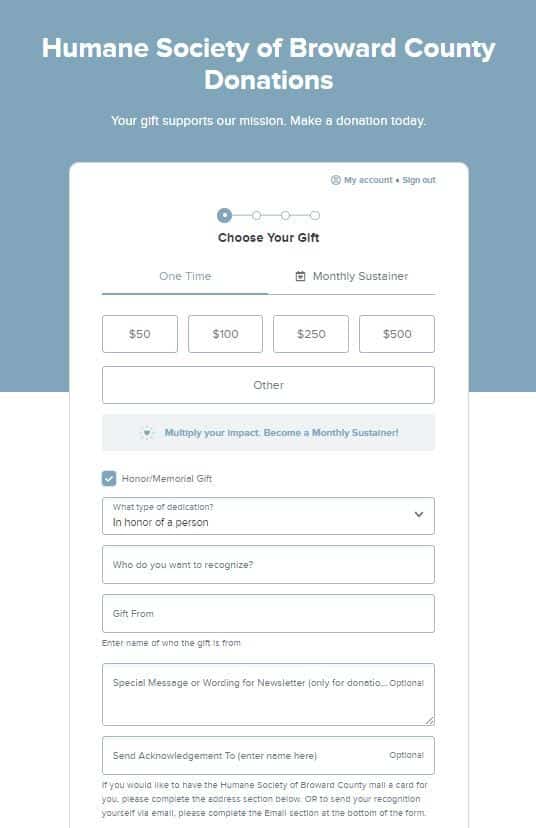
Find a donation page tool that lets you create custom fields for your donors, while keeping your form as simple as possible. Offer custom fields for tribute or memorial donations to be made in someone’s name or create fields for additional details you may need to collect from your donors, such as volunteer options. For example, here’s an example of a memorial giving option on the Humane Society of Broward County giving page:
To keep your donation pages simple while asking for extra information, use conditional logic. With conditional logic, some fields will remain hidden unless a donor answers a different field that provides more information. For example, if your donor chooses to hear about volunteer opportunities, you can add a conditional logic field to ask for their phone number or other details.
Another way to add custom fields while keeping forms easy to fill out is to use multi-step forms. Multi-step forms let you ask for information in chunks rather than in a single long form, making it feel less complicated for your donors to complete while still allowing you to collect additional information.
30. Allow donors to choose where their donation goes
Your donors want to know where their money is going and how their generosity helps to further your cause. Give your donors the option to choose a specific project within your organization that they want their gift to go toward within your donation page. This ensures your donors’ gifts help the projects most important to them.
With a multi-restriction system, you can give your donors the option to choose additional sub-restrictions within the project they decide to support. For example, if your organization operates in multiple locations, your donors can choose which area receives the funds for the project they support.
31. Build trust with transparency signals
A study of nonprofit transparency found that “organizations that went from not being transparent to being transparent saw an increase of 53 percent in total contributions, one year later.” The Mercy Corps donation page does an excellent job of offering transparency to its supporters by providing efficiency statistics, such as showing that the organization spent 86% of its resources on programs that help people in need.
32. Offer donors the option to send an e-card.
An eCard is a digital greeting card sent via email. Offer donors the option to access free eCards after donating or to send an eCard to notify a loved one that they donated in their honor. For example, Habitat for Humanity South Africa created a Christmas campaign with the option for donors to give a tribute gift and send an eCard:
Easy sharing options
After designing an optimized online donation form, your work is not done. You’ll also need to find creative ways to promote the form to a wider audience. Try these promotional strategies to increase awareness and engagement with your donation page:
33. Promote your donation page using Google Ads.
Google Ads are the sponsored search results that appear at the top of the page for certain search terms.
For example, take a look at this sponsored ad from the ASPCA that appears when you search “donate to animal shelter”:
Promoting your donation page via Google Ads is an effective way to reach people searching for terms relevant to your nonprofit’s mission.
As a nonprofit, you may also be eligible for the Google Ad Grant, which offers $10,000 per month in free Google advertising to qualifying organizations. Eligible organizations must hold 501(c)(3) status, have a functioning website with valuable content, and agree to the program’s requirements.
Optimize your Google Ad strategy by choosing high-volume, relevant keywords to target, creating compelling ad copy, and tracking your conversion and click-through rates to assess your progress.

34. Optimize your website’s CTAs.
Include call-to-action (CTA) buttons on your homepage, blog posts, about page, and event pages that lead users to your online donation form.
Ensure these buttons are bold, use contrasting colors, and feature compelling text urging website visitors to “GIVE NOW” or “DONATE.”
Take a look at this effective example from the Freedom Service Dogs of America website:
The large, red “DONATE” button stands out against the white background and smaller main menu items at the top of the page.

35. Share your donation form on all marketing platforms.
The more platforms you use to share your donation page, the more potential donors you can reach. Promote your digital donation form by:
- Including a link to it in your social media bios
- Incorporating the link into your social media posts
- Sharing the link in your email outreach
- Adding a QR code to your direct mail that leads to the form
This gives donors plenty of ways to connect, whether they’re using their mobile device, laptop, or checking the mail.
36. Include social sharing options.
Incorporate social media sharing buttons that make it easy for supporters to share the page with their networks. For instance, as mentioned, your donation confirmation page should include social media buttons so donors can share their donations with family and friends online.
Incentivize donors to share your donation link by commenting on their posts to thank them or entering their names into a prize drawing.
37. Incorporate your donation page into fundraising campaigns.
In addition to promoting your giving form in day-to-day social media posts, emails, and letters, you can also include it in specific fundraising campaigns to drive revenue.
Link to the form throughout fundraising initiatives, such as:
- Giving days (like GivingTuesday)
- Virtual or in-person fundraising events
- Crowdfunding campaigns
You should also encourage supporters to share your donation page link when you’re hosting an online campaign, such as a peer-to-peer fundraising campaign or social media video challenge.
38. Follow up with donors after they give.
After a donor gives for the first time through your online donation page, use their contact information to begin building long-term relationships.
Keep donors engaged by:
- Sending a welcome email series to introduce them to your nonprofit
- Inviting donors to participate in upcoming events or volunteer opportunities
- Showing donors the impact of their gifts by sharing statistics or testimonials from community members
Stewarding new donors is essential to retaining them for the long haul. Personalize your messages to new donors using their names and referencing their past interactions or donation amounts. This shows donors that your nonprofit sees them as individuals.
10 of the best nonprofit donation page examples for inspiration
1. St. Jude
The St. Jude donation page emphasizes the organization’s credibility at every step. Frequently asked questions help donors learn more about the giving process, increasing their confidence. Accreditations from Charity Navigator and the BBB demonstrate that the organization has been vetted by a reliable third party.
2. Feeding America
Feeding America’s giving page prioritizes impact. Donors can see the direct positive effect that a single dollar can have on people in need. Plus, the statement that they invest 98% of donations directly into mission-critical programs and services reassures donors that their investment in the organization is a smart one.
3. Farm Africa
The branding and imagery of the Farm Africa donation page leave a powerful impression. A single, eye-catching hero image dominates the left side of the page, allowing donors to form an emotional connection with the organization’s beneficiaries. The page’s design is simple and effective, with a straightforward form and tasteful incorporation of green tones from the brand’s color palette.
4. Girls Who Code
The Girls Who Code donation page keeps things simple, with a streamlined form. The page includes a quick case for support at the top, along with a few frequently asked questions to increase donors’ confidence. The form is uncluttered and simple to use, whether on a laptop, tablet, or mobile device.
5. CARE
The CARE giving form presents a robust case for support. The bold text at the top that says “GLOBAL HUNGER EMERGENCY” immediately catches donors’ attention and demonstrates the urgency of giving now. The page also highlights the impact of multiple donation amounts, showing donors how their gifts can make a difference for those in need:
- $44 can provide food for a family of five for one month
- $86 can provide a family with a goat as a source of both nutrition and income
- $248 can support emergency water trucking for communities suffering from drought
6. Habitat for Humanity
The Habitat for Humanity giving form not only allows donors to contribute online immediately but also highlights a variety of other giving avenues that supporters may be interested in. These opportunities include donating goods or services, stock donations, donor-advised funds (DAFs), cryptocurrency, and more. As a result, donors can contribute in ways that are most appropriate to their philanthropic goals and giving capacity.
7. The ASPCA
The ASPCA donation form offers a rotating carousel of images that tie donations to impact. For example, a $50 donation can pay for an animal's foster supplies for one month. The donation page features a straightforward three-step process, which includes separate pages for selecting the donation amount, entering billing information, and providing payment details. This structure simplifies the giving experience, helping donors avoid a lengthy page filled with numerous form fields that can feel overwhelming.
8. Doctors Without Borders
The Doctors Without Borders donation page opens with a message of gratitude to donors. Donor appreciation is essential throughout every stage of the giving process. A study examining the effects of donor gratitude found that sending brief thank-you messages to supporters after they engage with your organization—but before they become donors—can double the likelihood that they will donate in the future. That’s why including the message “Thank you for supporting our lifesaving work” is a smart move for Doctors Without Borders—it can give supporters who may be on the fence about donating a sense of goodwill that drives them to complete a gift.
9. The Malala Fund
The Malala Fund donation page is robust yet straightforward. It includes everything donors need to know—the organization’s approach, donors’ impact, more ways to give, and FAQs—without overwhelming supporters with too much information. As a result, supporters can feel empowered knowing that their gifts will go directly toward girls’ education worldwide.
10. David Shepherd Wildlife Foundation
The David Shepherd Wildlife Foundation donation form features a bold look, with dark, moody images that convey the gravity of the conservation crisis. The form takes a very stripped-down approach, keeping the focus solely on online giving. Donors have a brief case for support and impact information, which helps motivate them to give without inundating them.
Donation page best practices checklist
Optimizing your fundraising framework starts with eliminating friction and building immediate trust at the point of transaction. This scannable checklist provides a blueprint for auditing your current setup or evaluating a new donation page template to maximize conversion rates.
By implementing these donation page standards, you can significantly reduce abandonment and capture low-hanging fruit directly from your traffic. Regularly A/B test these elements to see which specific tweaks yield the highest sustained conversion lift for your unique audience.
How can nonprofits set up a donation page?
Now that you’ve reviewed essential best practices to keep in mind for building your donation page, you’re ready to start designing the form. But how can you turn your plans into reality?
Setting up your donation page first requires investing in an online donation platform that lets you create unlimited fundraising forms through a user-friendly interface. We recommend Bloomerang Fundraising, a powerful platform that combines the best of donor management and fundraising tools into one intuitive system.
Follow these steps to use Bloomerang Fundraising to design your compelling donation page:
Step 1: Determine whether you want your form to be single-page or multi-step.
Bloomerang Fundraising enables both styles—either option can work based on your preferences.
Step 2: Choose your suggested donation amounts.
Use the best practices above, such as basing suggestions around your median donation amount, to set reasonable suggestions on your giving form.

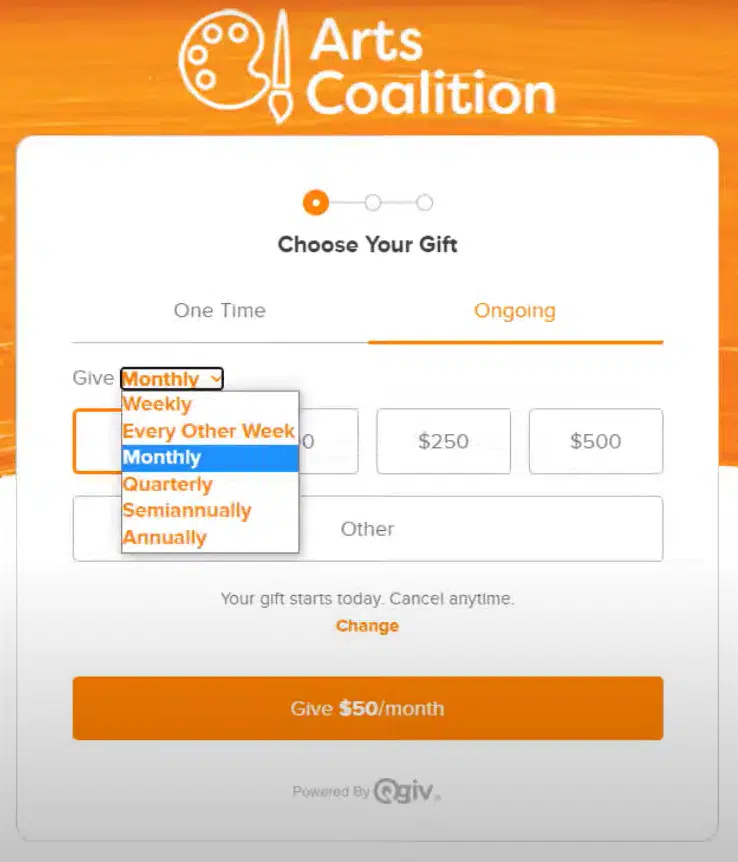
Step 3: Select recurring giving frequencies.
Bloomerang Fundraising enables giving frequencies of weekly, every other week, monthly, quarterly, semiannually, and annually. You can choose to offer all of these options or just a few.
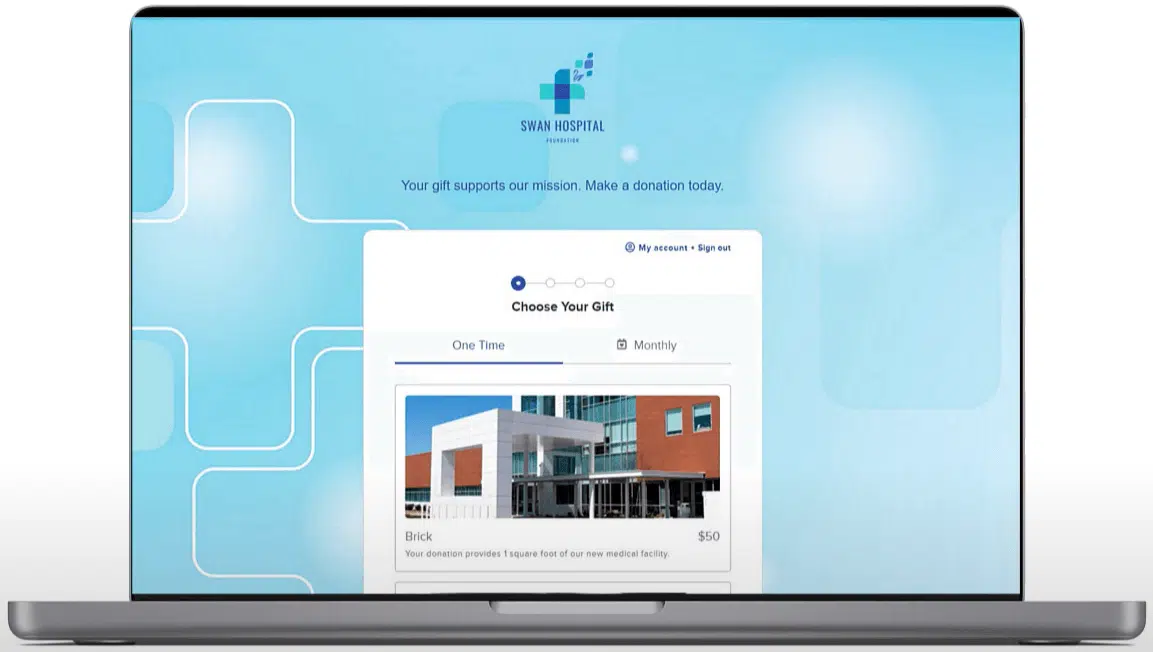
Step 4: Brand the page to your nonprofit.
Add your logo, brand colors, and a background or header image.
Step 5: Add custom and conditional fields.
You can add custom fields to the second step of the form (called “donor details”) or the third step (called “additional details”). We recommend including just one or two custom fields to keep the form streamlined. Choose from multiple field types, including free-form responses, checkboxes, drop-downs, and multiple selection. Ask supporters anything you want to know about, whether their interest in volunteering, their T-shirt size, or their dietary restrictions.

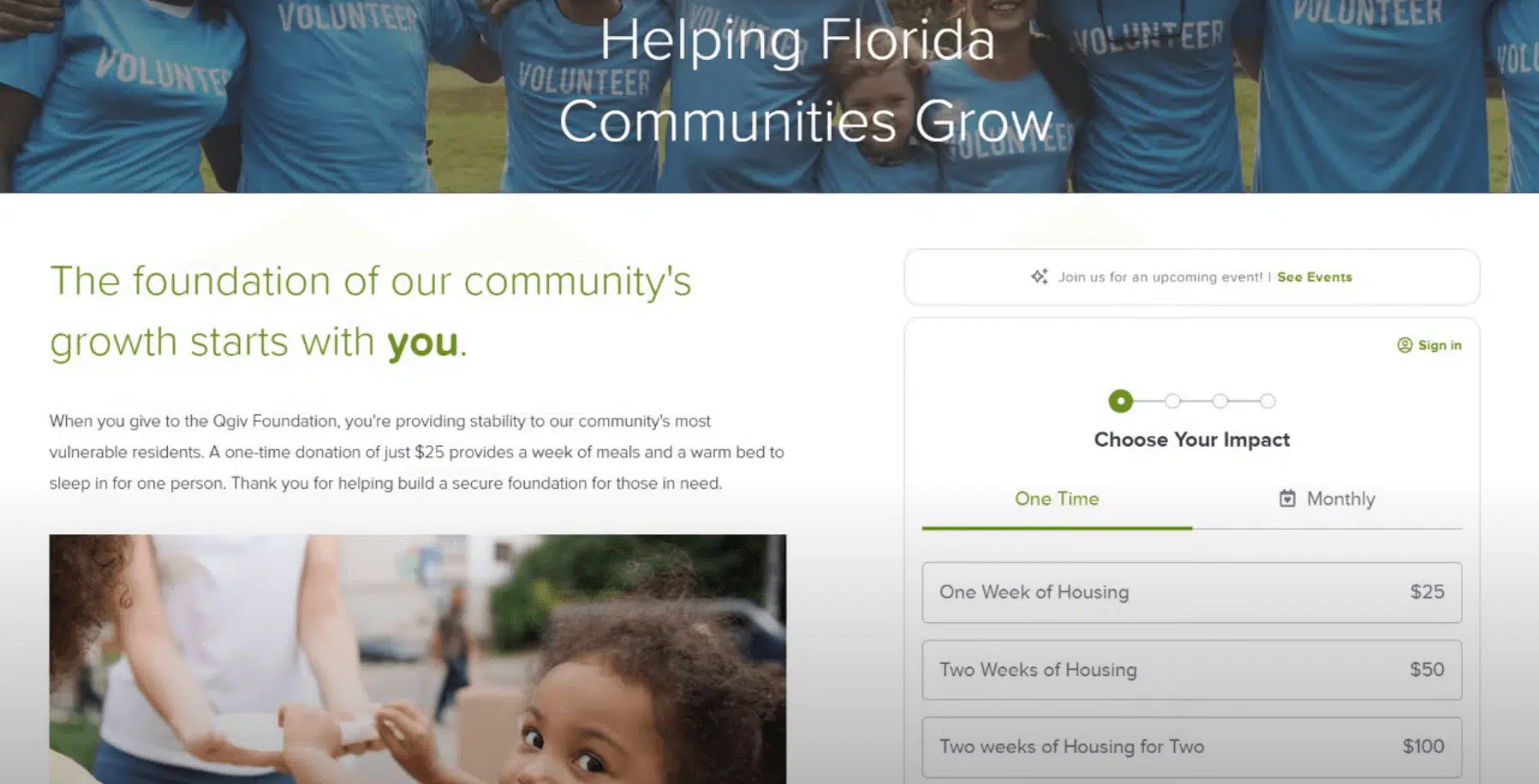
Step 6: Add images to different donation amounts.
Show donors the true impact of their gifts by adding real photos that illustrate the positive effects of giving at different levels. For example, you could show an image of one child being helped for your lowest donation amount, and a photo of a group of children for your highest suggested donation.

Step 7: Optimize your donation confirmation page and receipts.
Make your confirmation page more engaging by adding images, a video, and social sharing widgets.
Customize your email receipts by adding images, incorporating your branding, and featuring a unique, compelling subject line. You can also use tags to automatically enter donor information, such as their names and gift amounts.


Step 8: Embed your donation form into your website.
Bloomerang Fundraising users who embed their donation forms on their websites see a 2.4x increase in overall, one-time, and recurring donation conversion rates.
How Bloomerang helps build high-converting donation pages
Bloomerang Fundraising offers an intuitive, integrated suite of fundraising tools designed to help nonprofits maximize the impact of their efforts. Our solutions help you raise more with less stress and attract new donors to your cause.
Nonprofits love to use our solutions to create customized, intuitive, and high-converting donation forms. Our donation pages feature the following elements:
- Custom branding and personalization
- Multiple payment methods (credit cards, Apple Pay, PayPal, Venmo, Google Pay, and Express Donate)
- AI-powered suggested giving amounts
- Timely recurring giving prompts
- Flexible giving
- Abandoned gift reminders
- Matching gift prompts
- Built-in fraud detection
With these robust tools, our customers see real results. Our fundraising software helps them:
- Convert 55% more donations through Express Donate.
- Grow donation sizes by 37%.
- Recover 5% of abandoned gifts with the help of abandoned gift reminders

Wrapping up
The way you design and promote your nonprofit’s donation page can have a major impact on your overall online fundraising success. A strong donation page drives donations and sets the stage for future donor engagement.
If you’re looking for more tips on optimizing your online fundraising process, check out these additional resources:
- 23 Fundraising Platforms to Supercharge Donations in 2026. Looking for new fundraising software to support your online donation process? Review the top options that might work for your organization.
- How to Buy Fundraising Software That Lasts: Essential Guide. How can you find the best software solutions for your nonprofit? Start with this buyer’s guide to simplify the process.
- How to Upgrade Nonprofit Donors Using Suggested Donations. Want to learn more about how suggested donations impact online fundraising? Explore this strategy in more depth with this post.